
OnePlay Promotion Wallet Usage Guide
The OnePlay Promotion Wallet is used specifically within the Promotion Games section. This guide explains how to access Promotion Games, choose an available game, select your Promotion Wallet balance and enter the game in four simple steps.
How to Use the OnePlay Promotion Wallet
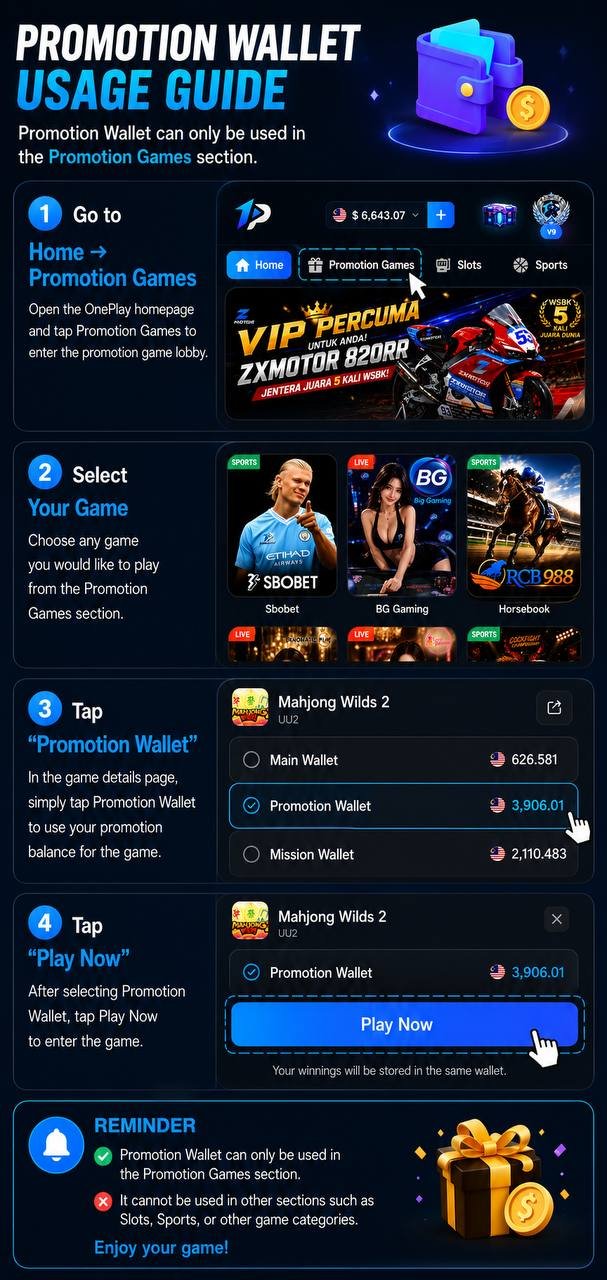
Follow the Four-Step Promotion Wallet Process
Using the OnePlay Promotion Wallet involves four steps: open Promotion Games from the homepage, select a game from the Promotion Games section, choose Promotion Wallet on the game details page, and tap Play Now to enter the selected game.
Go to Promotion Games
Step 1 – Open the Promotion Games Section
Start from the OnePlay homepage and select Promotion Games from the navigation menu. This opens the dedicated promotion game lobby where the Promotion Wallet can be used.
Select a Promotion Game
Step 2 – Choose Your Game
Browse the games available within the Promotion Games section and choose the game you want to enter. The Promotion Wallet is intended for games presented in this dedicated section.
Choose the Promotion Wallet
Step 3 – Select Promotion Wallet
On the selected game’s details page, choose Promotion Wallet as the wallet you want to use. The page displays the available wallet options and their respective balances, allowing you to select the promotional balance for the game.
Enter the Game with Promotion Wallet
Step 4 – Tap Play Now
After selecting Promotion Wallet, tap Play Now to enter the game. When playing with this wallet, winnings from the game will be stored in the same wallet.
Where the Promotion Wallet Can Be Used
Promotion Games Only
The OnePlay Promotion Wallet can only be used in the Promotion Games section. To use your promotional balance, enter the dedicated Promotion Games lobby and select an available game from there.
Other Game Sections Are Not Supported
Promotion Wallet cannot be used in other sections such as Slots, Sports, or other game categories. Use the Promotion Games section when you want to play with your Promotion Wallet balance.
OnePlay Promotion Wallet FAQ
What is the OnePlay Promotion Wallet used for?
The OnePlay Promotion Wallet is used for games available within the Promotion Games section.
How do I access Promotion Games?
Open the OnePlay homepage and select Promotion Games from the navigation menu to enter the promotion game lobby.
How do I use my Promotion Wallet balance?
Enter Promotion Games, choose an available game, select Promotion Wallet on the game details page, and tap Play Now.
Can I use the Promotion Wallet for Slots?
No. The supplied OnePlay guide states that Promotion Wallet can only be used within the Promotion Games section and cannot be used in other sections such as Slots.
Can I use the Promotion Wallet for Sports?
No. Sports is outside the dedicated Promotion Games section, so the Promotion Wallet cannot be used there.
Where are winnings stored when I use Promotion Wallet?
When a game is entered using the Promotion Wallet, the resulting winnings are stored in the same wallet.
What are the steps for using the OnePlay Promotion Wallet?
Go to Home → Promotion Games, select your game, choose Promotion Wallet, and tap Play Now to enter the game.
Use Your OnePlay Promotion Wallet
Visit Promotion Games, choose an available game and select your Promotion Wallet balance before tapping Play Now.