
OnePlay Promo Code Redemption Guide
The OnePlay Promo Code Redemption Guide explains how to enter, activate and redeem a valid promo code in four simple steps. Open the Promo Code feature from the Treasure Chest, enter the code exactly as provided, activate it and redeem the available reward to your wallet.
How to Redeem a OnePlay Promo Code
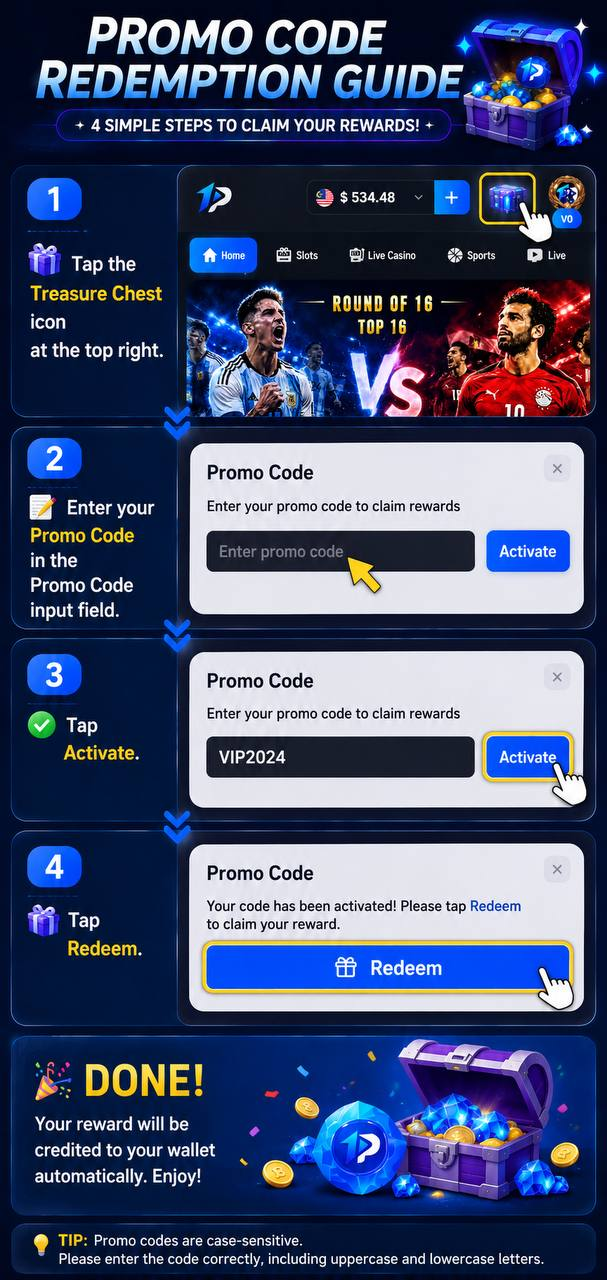
Complete the Redemption in Four Steps
The OnePlay Promo Code redemption process consists of four steps: tap the Treasure Chest icon, enter your promo code, tap Activate, and then tap Redeem. Once the redemption is completed successfully, the corresponding reward will be credited to your wallet automatically.
Open the Promo Code Feature
Step 1 – Tap the Treasure Chest Icon
Start from the OnePlay platform and locate the Treasure Chest icon at the top right of the page. Tap the icon to open the Promo Code feature.
Enter and Activate Your Promo Code
Step 2 – Enter Your Promo Code
Enter your available code into the Promo Code input field. Make sure the complete code is entered correctly before proceeding.
Step 3 – Tap Activate
After entering the promo code, tap Activate. When the code has been activated successfully, the page will confirm the activation and provide the option to redeem the associated reward.
Redeem Your Promo Code Reward
Step 4 – Tap Redeem
Once your promo code has been activated, tap Redeem to claim the reward. After successful redemption, the reward will be credited to your wallet automatically.
Important Promo Code Entry Tips
Promo Codes Are Case-Sensitive
OnePlay promo codes are case-sensitive. Enter every uppercase and lowercase letter exactly as provided. An incorrectly entered code may not activate, so review the code carefully before tapping Activate.
Activate Before Redeeming
Entering a code alone does not complete the process. The promo code must first be activated successfully before the Redeem option becomes available for the corresponding reward.
OnePlay Promo Code Redemption FAQ
Where do I enter a OnePlay promo code?
Tap the Treasure Chest icon at the top right to access the Promo Code feature, then enter your code in the provided input field.
How do I activate a OnePlay promo code?
Enter the promo code correctly in the Promo Code field and tap Activate. A successful activation will allow you to proceed with the reward redemption.
How do I redeem my reward after activating a promo code?
After successful activation, tap the Redeem button to claim the corresponding reward.
Where will my promo code reward be credited?
After successful redemption, the reward will be credited to your wallet automatically.
Are OnePlay promo codes case-sensitive?
Yes. Promo codes are case-sensitive, so uppercase and lowercase letters must be entered exactly as shown in the code you received.
What should I check if my promo code does not activate?
First check that the promo code has been entered exactly as provided, including the correct uppercase and lowercase letters.
What is the complete OnePlay promo code redemption process?
Tap the Treasure Chest icon → enter your Promo Code → tap Activate → tap Redeem. After successful redemption, the reward is automatically credited to your wallet.
Redeem Your OnePlay Promo Code
Open the Treasure Chest, enter your promo code exactly as provided, activate it and redeem your available reward.