
OnePlay Withdraw – MYR & USDT Withdrawal Guide
OnePlay Withdraw supports withdrawals through MYR bank accounts and USDT wallet addresses. The withdrawal page displays the withdrawable balance, total balance, daily withdrawal limit, transaction fee and final amount received before submission. Follow the correct withdrawal steps and verify your bank account or crypto wallet information carefully before confirming a request.
OnePlay Withdrawal Methods
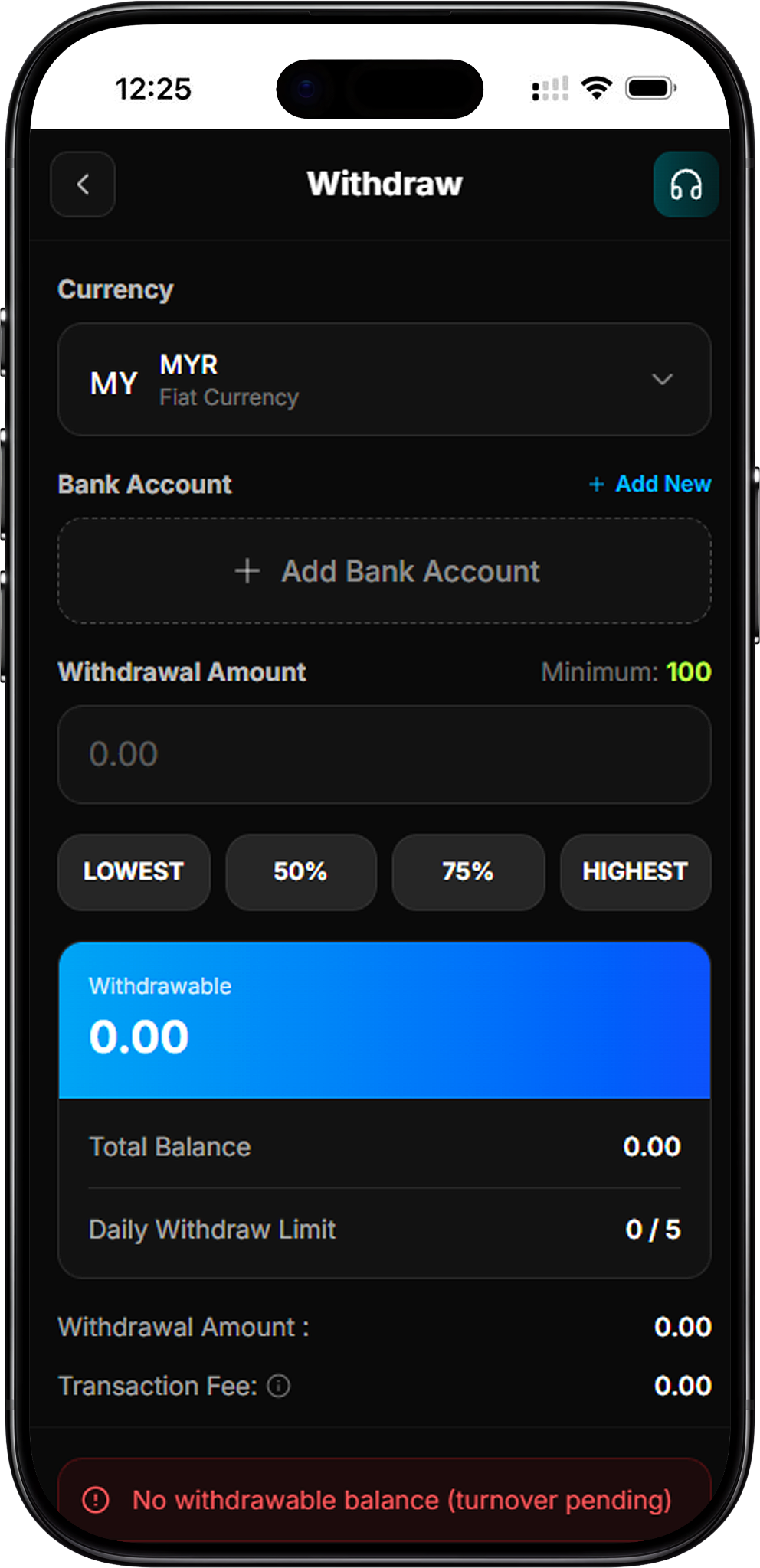
MYR Bank Withdrawal
OnePlay provides MYR fiat currency withdrawal to a selected bank account. Members can choose an existing bank account or use Add New to add bank account details before making a withdrawal request.
USDT Withdrawal
OnePlay also provides USDT cryptocurrency withdrawal. Instead of selecting a bank account, members must select or add the appropriate wallet address before entering the withdrawal amount.
How to Withdraw from OnePlay
Step 1 – Open Withdraw
Open the Withdraw page to access the withdrawal form. The page displays the available currency, withdrawal destination, withdrawal amount and current balance information.
Step 2 – Select Your Currency
Open the Currency selector and choose the required withdrawal currency. The available options shown are MYR under Fiat Currencies and USDT under Cryptocurrencies.
Step 3 – Select or Add a Withdrawal Destination
For MYR, select the bank account that will receive the funds or choose Add New if a bank account needs to be added. For USDT, select or add the correct wallet address.
Step 4 – Enter the Withdrawal Amount
Enter the amount you want to withdraw. The page also provides LOWEST, 50%, 75% and HIGHEST selection buttons for choosing an amount based on the available withdrawal balance.
Step 5 – Review the Withdrawal Details
Before submitting, check the Withdrawable balance, Total Balance, Daily Withdraw Limit, Withdrawal Amount, Transaction Fee and Amount Received displayed on the page.
Step 6 – Submit the Withdrawal
After confirming the currency, destination and amount, select WITHDRAWAL to submit the request. A request cannot proceed when there is no withdrawable balance, such as when turnover remains pending.
How to Withdraw MYR to a Bank Account
Step 1 – Select MYR
Choose MYR – Fiat Currency from the Currency menu to use the bank withdrawal option.
Step 2 – Select Your Bank Account
Choose the bank account that should receive the withdrawal. If the required account has not yet been added, select Add New and complete the required bank account setup.
Step 3 – Enter Your MYR Withdrawal Amount
Enter the required withdrawal amount or use one of the available amount-selection buttons. The withdrawal interface shown specifies a minimum withdrawal amount of 100.
Step 4 – Check the Amount Received
Review the Withdrawal Amount and any Transaction Fee displayed by the system. The Amount Received field shows the resulting amount before the withdrawal is submitted.
Step 5 – Confirm the Bank Withdrawal
Verify that the bank account and withdrawal details are correct, then select WITHDRAWAL to submit the MYR withdrawal request.
How to Withdraw USDT to a Wallet Address
Step 1 – Select USDT
Open the Currency menu and choose USDT – Cryptocurrency to access the crypto withdrawal option.
Step 2 – Add or Select a Wallet Address
Choose the wallet address that should receive the USDT. If no address has been added, select Add New or Add Wallet Address and provide the required wallet information.
Step 3 – Enter the USDT Withdrawal Amount
Enter the amount to withdraw. The USDT withdrawal screen shown specifies a minimum withdrawal amount of 100 and also provides LOWEST, 50%, 75% and HIGHEST amount-selection options.
Step 4 – Verify the Wallet Address and Network
Carefully confirm both the wallet address and network before continuing. The platform specifically warns that cryptocurrency withdrawals are irreversible, making accurate wallet and network details essential.
Step 5 – Review and Submit
Check the withdrawable balance, withdrawal amount, transaction fee and amount received. Once all details are correct, select WITHDRAWAL to submit the USDT withdrawal request.
OnePlay Withdrawal Amount & Daily Limit
Minimum Withdrawal
The supplied withdrawal screens display a minimum withdrawal amount of 100 for both the MYR and USDT withdrawal interfaces. Always refer to the amount and requirements currently displayed on the withdrawal page when submitting a request.
Daily Withdrawal Limit
The withdrawal interface displays a Daily Withdraw Limit of 0 / 5, indicating that the account shown can make up to 5 withdrawals per day. The current usage is displayed directly in the withdrawal balance panel.
Withdrawable Balance
The Withdrawable value indicates the balance currently available for withdrawal. This can differ from the Total Balance. If the page displays “No withdrawable balance (turnover pending)”, a withdrawal cannot be submitted from that balance until it becomes withdrawable.
Transaction Fee & Amount Received
The withdrawal page separately displays the Withdrawal Amount, Transaction Fee and Amount Received. Review these figures before confirming the request rather than assuming the amount received will always equal the amount entered.
Important OnePlay Withdrawal Notices
Bank Maintenance Period
Certain banks have a daily maintenance period from 11:55 PM to 12:30 AM. Withdrawal requests may be delayed during this period and will be processed after the affected banks resume normal operations.
Use the Same Bank Account for Deposits and Withdrawals
OnePlay states that deposits and withdrawals must use the same bank account. The withdrawal notice warns that failure to follow this requirement, or the use of third-party payment channels, may result in funds being forfeited.
Check Crypto Details Carefully
For USDT withdrawals, verify the wallet address and network carefully before submission. Crypto withdrawals are irreversible, so an incorrect wallet address or network can prevent the transferred funds from being recovered.
Contact Customer Service When Needed
If you have questions about a withdrawal, bank account requirement or displayed withdrawal status, contact OnePlay online customer service for assistance before proceeding.
OnePlay Withdraw FAQ
What withdrawal currencies does OnePlay support?
The supplied withdrawal interface shows MYR as a fiat currency option and USDT as a cryptocurrency option.
What is the minimum OnePlay withdrawal amount?
The supplied MYR and USDT withdrawal screens both display a minimum amount of 100. Check the current withdrawal page before submitting because the applicable information is displayed directly by the system.
How many withdrawals can I make per day?
The supplied withdrawal interface displays a daily limit of 5 withdrawals, with the current usage shown in the Daily Withdraw Limit section.
Why does OnePlay show “No withdrawable balance (turnover pending)”?
This message indicates that there is currently no balance available to withdraw because turnover is still pending. The Withdrawable balance shown on the page determines the amount currently available for a withdrawal request.
Can I withdraw MYR to a different bank account?
The withdrawal notice states that deposits and withdrawals must be made using the same bank account. Members should therefore verify that the selected withdrawal bank account matches the account used for deposits.
Can I withdraw OnePlay funds in USDT?
Yes. USDT appears as a cryptocurrency option on the supplied withdrawal interface. A wallet address must be selected or added before submitting the withdrawal.
Can a USDT withdrawal be reversed?
The platform warns that cryptocurrency withdrawals are irreversible. Check the wallet address and network carefully before submitting a USDT withdrawal.
Why might a bank withdrawal be delayed?
Certain banks undergo daily maintenance from 11:55 PM to 12:30 AM. Withdrawal requests made during this period may be delayed until normal banking operations resume.
Withdraw Your OnePlay Balance
Select MYR or USDT, verify your withdrawal destination and amount, review the displayed transaction details, and submit your withdrawal request.