
OnePlay Register – Create Your Account
Complete your OnePlay Register to create an account and access the OnePlay platform. The sign up form requires a username, phone number and password, while a valid Referral Code may already be provided when you enter through an invitation or QR Code. Before registering, you must confirm that you are at least 18 years old and agree to the User Agreement.
How to Complete OnePlay Register

The OnePlay Register process can be completed through the registration form. Follow the steps below and make sure the information you provide is true and accurate before submitting your account registration.
Step 1: Open the OnePlay Registration Page
Go to the OnePlay registration page or access the registration form through the provided registration link or QR Code.
Step 2: Enter Your Username
Choose a username for your OnePlay account and enter it in the Username field.
Step 3: Enter Your Phone Number
Select the appropriate country calling code and enter your phone number in the required field. Check the number carefully before continuing.
Step 4: Create Your Password
Enter the password you want to use for your account. Keep your login information private and do not share your password with other people.
Step 5: Check the Referral Code
If you entered the registration page through a referral invitation, check the Referral Code displayed in the form. A valid code is indicated by the registration interface before you proceed.
Step 6: Review the User Agreement
Read the User Agreement before creating your account. By registering for or using OnePlay, you agree to the applicable platform terms.
Step 7: Confirm You Are 18 or Older
Tick the agreement checkbox to confirm that you accept the User Agreement and are 18 years of age or older.
Step 8: Select Register
Review the details you entered, then select Register to submit your OnePlay sign up. If you already have an account, use the Log In option instead of creating another account.
Information Required for OnePlay Sign Up

The OnePlay Sign Up form asks for essential account information. Providing accurate details helps ensure that your registration information corresponds to the account you create.
Username
A username is required when creating your OnePlay account. Enter the username you want associated with the account.
Phone Number
A phone number is required on the registration form. Select the relevant country calling code before entering your number.
Password
Create a password for accessing your account. Your password should be kept confidential and used only for your own account access.
Referral Code
The registration form can display a Referral Code associated with your invitation. Check that the interface identifies the code as valid before submitting your registration.
Register with a Referral Code or QR Code
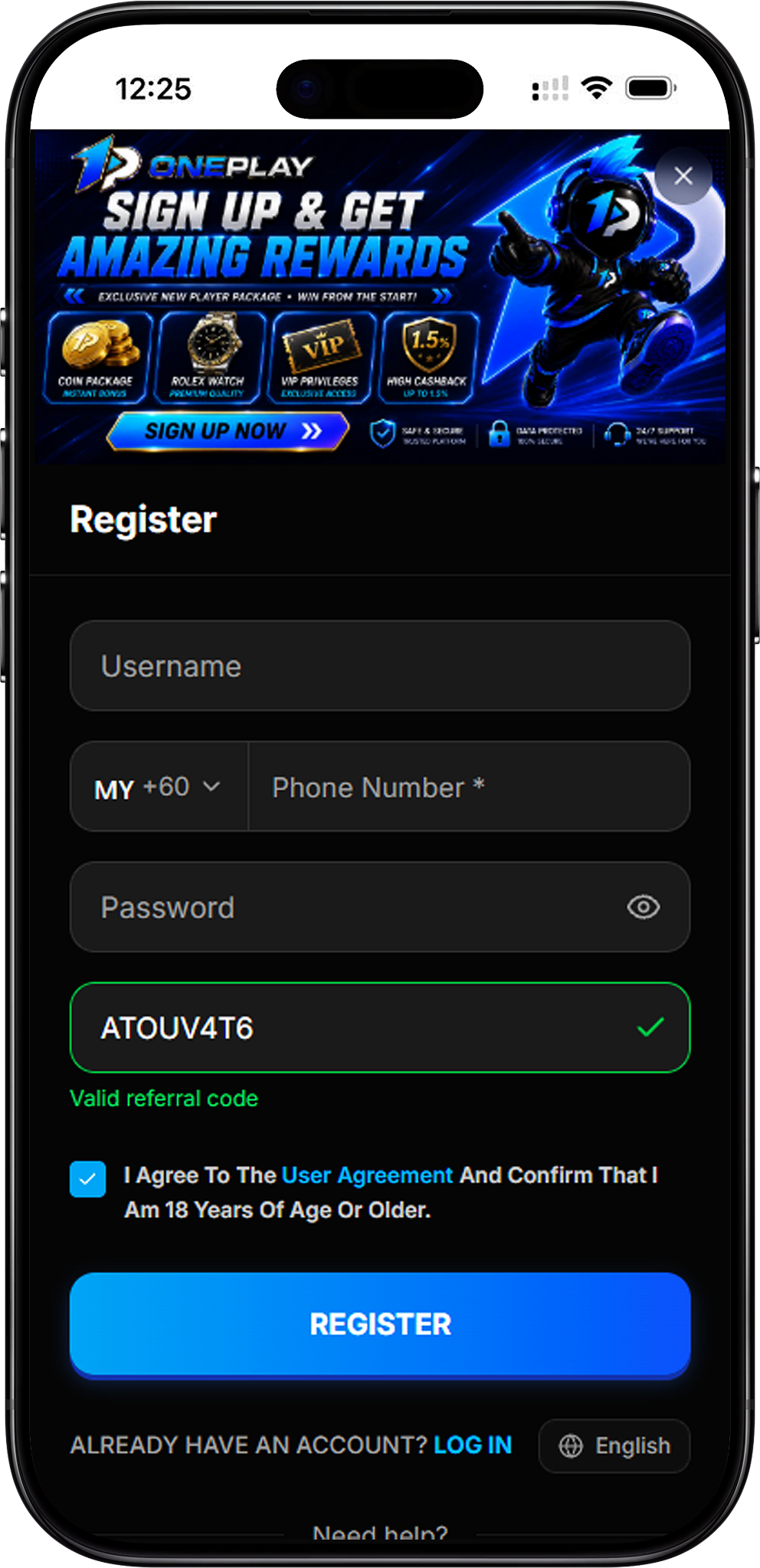
OnePlay registration may be accessed through a Referral Code or QR Code provided for registration. These methods can direct you to the sign up process and may associate the relevant referral information with the registration form.
Using a Referral Code
When a referral code appears in the registration form, verify that it is shown as valid. Complete the remaining required fields before selecting Register.
Using a QR Code
Scan the provided QR Code with a compatible device to open its registration destination. Once the OnePlay sign up page opens, review the registration details and continue with the required account information.
One Account per User
According to the OnePlay User Agreement, each user may register only one account. The information submitted during registration must be true and accurate. If you already have a OnePlay account, select Log In rather than completing another registration.
Keep Your Registration Information Accurate
Review your username, phone number and other information before submitting the form. The User Agreement also prohibits the use of another person’s information, fraud, cheating, abuse and illegal activity.
Before You Create Your OnePlay Account
Before completing your registration, review the account requirements and the User Agreement so you understand the conditions that apply when using the platform.
Age Requirement
OnePlay requires users to be 18 years of age or older. The registration form requires you to confirm this requirement before your account registration can be submitted.
Agree to the User Agreement
Registering for or using the platform indicates agreement with the OnePlay User Agreement. The agreement states that OnePlay may review, suspend or terminate accounts found to violate its terms.
Review the Latest Terms
OnePlay states that its User Agreement and promotional rules may be updated, with changes taking effect upon publication. Users who continue using the platform agree to the latest version of the User Agreement.
OnePlay Register FAQ
How do I register for OnePlay?
Open the registration form, enter your username, phone number and password, check the referral information where applicable, agree to the User Agreement and confirm that you are at least 18 years old. Then select Register to submit the form.
What information do I need for OnePlay Register?
The registration interface requires a username, phone number and password. A referral code may also appear as part of the registration process.
Can I register OnePlay with a Referral Code?
Yes. The registration form supports referral information and indicates when the displayed Referral Code is valid.
Can I use a QR Code for OnePlay Sign Up?
A QR Code can provide access to its associated registration destination. After scanning it, review the page and complete the required OnePlay sign up information.
How old do I need to be to register?
You must be 18 years of age or older. The registration form requires confirmation of this before registration.
Can I create more than one OnePlay account?
No. The OnePlay User Agreement states that each user may register only one account.
What should I do if I already have an account?
Use the Log In option shown on the registration page instead of registering another account.
Create Your OnePlay Account
Start your OnePlay Register by completing the required sign up details, reviewing the User Agreement and confirming that you meet the age requirement.