
OnePlay Top Up – Deposit Methods & Step-by-Step Guide
OnePlay Top Up supports multiple deposit methods for funding an account, including GlobePay, DGPay, EpicPay, Pin Reload and USDT via TRC20. Fiat deposit options support MYR and SGD, while available payment methods include online banking, P2P transfer, QR Code and supported reload PIN providers. Follow the relevant steps and verify all payment information before submitting a deposit.
OnePlay Top Up Methods
Fiat Currency Deposits
OnePlay Top Up provides fiat deposit options through GlobePay, DGPay, EpicPay and Pin Reload, with MYR and SGD available as supported deposit currencies. The exact payment flow depends on the selected recharge method.
GlobePay
GlobePay supports Online Banking and QR Code deposits. For Online Banking, members select the deposit amount and proceed to the secure payment page, where an available payment bank can be selected to complete the transaction. QR Code deposits require a verified bank account before proceeding.
DGPay
DGPay provides P2P Transfer and QR Code payment types. Members can choose the required payment type, enter or select the deposit amount and continue through the payment instructions displayed by the system. A verified bank account is required for QR payment.
EpicPay
EpicPay provides an online banking deposit route. The available bank list shown on the platform includes FPX eWallet, FPX DuitNow, Alliance Bank, Bank Simpanan Nasional, OCBC Malaysia, UOB Malaysia, Bank Rakyat, FPX Internet Banking, Maybank, CIMB Bank, Hong Leong Bank, RHB Bank, AmBank, DuitNow QR and Touch ’n Go. Availability should be checked directly on the deposit page when making a transaction.
Pin Reload
Pin Reload supports Maxis, Digi, Celcom, U Mobile and Touch ’n Go. Members select the provider and enter the corresponding reload PIN. Required PIN lengths differ by provider: Maxis accepts 14 or 16 digits, Digi and Celcom accept 15 or 16 digits, U Mobile accepts 14 digits, and Touch ’n Go accepts 10 digits.
USDT TRC20
Cryptocurrency deposits are available through USDT on the TRC20 network. The deposit page provides a recharge address and QR Code for completing the transfer. The displayed minimum deposit is 10 USDT. Only the supported network shown on the deposit page should be used.
How to Top Up OnePlay with GlobePay
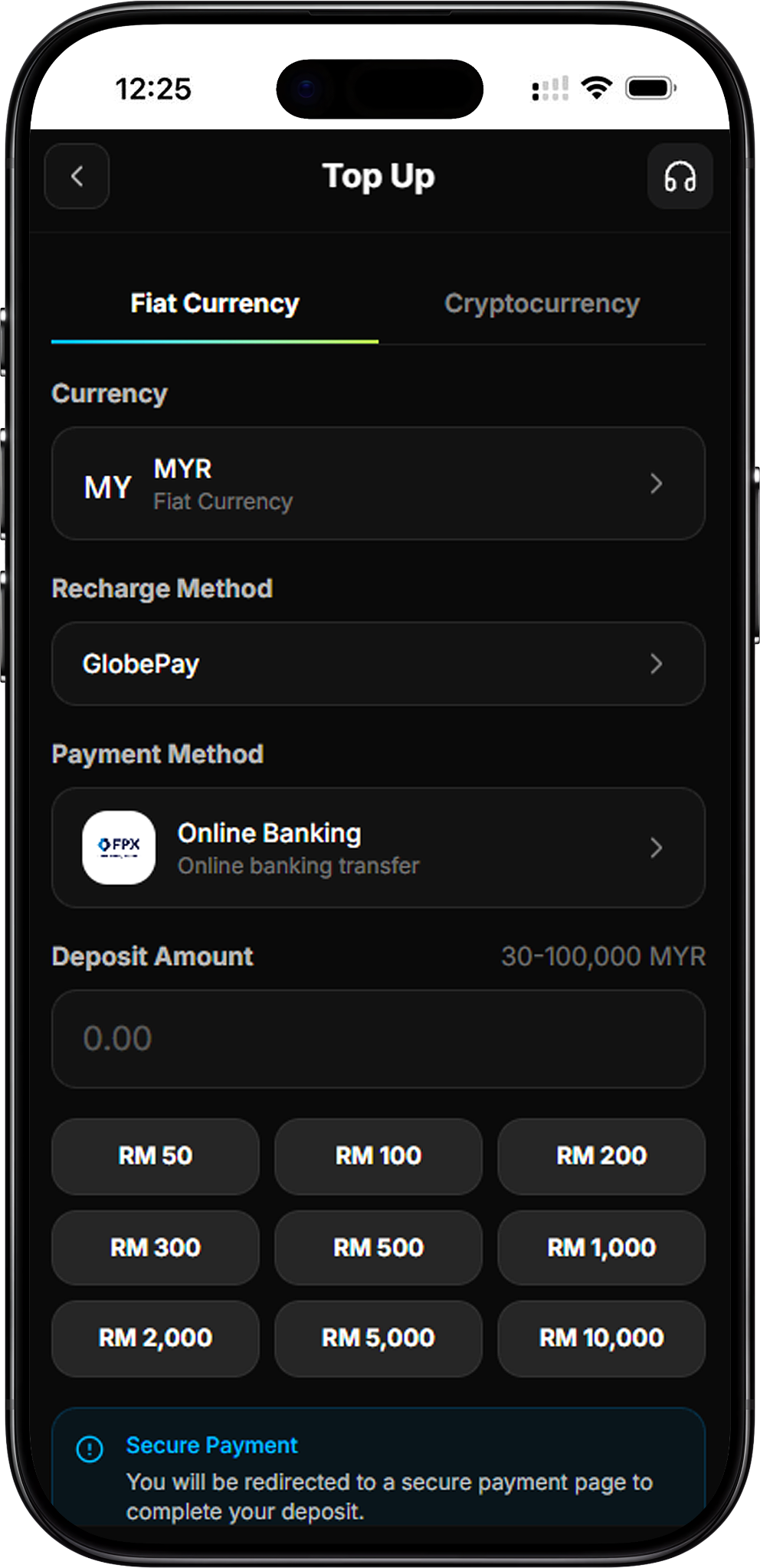
Step 1 – Select Fiat Currency and GlobePay
Open Top Up, stay on the Fiat Currency tab, select the supported currency such as MYR or SGD, and choose GlobePay as the recharge method.
Step 2 – Choose Online Banking or QR Code
Select the available GlobePay payment method. For Online Banking, enter the required deposit amount and proceed to payment. For QR Code, follow the QR payment option shown on the Top Up page.
Step 3 – Select Your Payment Bank
For an online banking transaction, the secure payment page allows you to select an available bank before continuing. Confirm that the selected bank and payment details are correct.
Step 4 – Complete the Deposit
Follow the instructions on the secure payment page to complete the bank transaction. Do not repeatedly submit or refresh the payment page while the transaction is being processed.
GlobePay QR Code Requirement
GlobePay QR payments require a verified bank account. If verification has not been completed, the platform displays a Bank Verification Required prompt and asks the member to add and verify a bank account before proceeding.
How to Top Up OnePlay with DGPay
Step 1 – Select DGPay
From the Top Up page, select the required fiat currency and choose DGPay as the recharge method.
Step 2 – Choose P2P Transfer or QR Code
Select P2P Transfer for a direct transfer or QR Code for scan-to-pay. Enter or select the deposit amount shown on the page before continuing.
Step 3 – Complete a P2P Transfer
For P2P Transfer, proceed to the payment page and select an available bank according to the payment instructions. Verify the payment amount and banking information before completing the transfer.
Step 4 – Complete a QR Code Deposit
Select QR Code and proceed to obtain the payment QR Code. QR payment methods require a verified bank account, so members who have not completed verification will be asked to add and verify their bank account first.
How to Top Up OnePlay with EpicPay
Step 1 – Select EpicPay
Open Top Up, choose Fiat Currency, select MYR or SGD as applicable, and choose EpicPay under Recharge Method.
Step 2 – Select a Bank
Open Select Bank and choose one of the currently available payment options displayed by the platform. Because payment availability may change, use the options shown on the Top Up page at the time of your deposit.
Step 3 – Enter the Deposit Amount
Enter the required whole-number deposit amount or select one of the displayed preset amounts. Review the amount carefully before proceeding.
Step 4 – Proceed to Payment
Select Proceed to Payment and follow the secure online banking instructions to complete the deposit through the selected payment option.
How to Top Up OnePlay with Pin Reload
Step 1 – Select Pin Reload
Open Top Up, remain under Fiat Currency and choose Pin Reload as the recharge method.
Step 2 – Choose Your Provider
Select one of the supported providers: Maxis, Digi, Celcom, U Mobile or Touch ’n Go. Check the required PIN length shown for the selected provider.
Step 3 – Enter the Reload PIN
Enter the reload PIN exactly as shown on your voucher. The platform requires the PIN to match the valid length for the selected provider before submission.
Step 4 – Submit the PIN
Check the provider and PIN information, then select Submit PIN to submit the Pin Reload deposit.
Pin Reload Transaction Fees
Transaction fees are borne by the player. The supplied rates are Digi 26.0%, Maxis 26.0%, Celcom 27.0%, U Mobile 25.5%, and Touch ’n Go (TNG) 8.0%. The actual credited amount equals the deposit amount minus the applicable transaction fee. Members should check the latest fee displayed on the deposit page before submitting.
Pin Reload Calculation Example
If RM100 is deposited through Touch ’n Go (TNG) with an 8% transaction fee, RM8 is deducted and the actual credited amount is RM92. The actual credited amount displayed or processed by the platform should be treated as the applicable amount.
How to Top Up OnePlay with USDT TRC20
Step 1 – Select Cryptocurrency
Open Top Up and switch from Fiat Currency to Cryptocurrency. Select USDT as the currency and TRC20 as the supported network.
Step 2 – Copy the Address or Scan the QR Code
Copy the USDT deposit address displayed on the page or scan the provided QR Code using your cryptocurrency wallet or exchange. Confirm that the destination and network are correct before transferring funds.
Step 3 – Complete the USDT Transfer
Transfer the intended amount of USDT to the provided address. The Top Up page displays a minimum deposit of 10 USDT. The deposit amount submitted to OnePlay must match the actual transfer amount.
Step 4 – Upload Transfer Proof
After completing the transfer, upload a clear and complete screenshot of the transaction receipt as the required receipt proof.
Step 5 – Submit the Deposit Request
Verify the deposit details and select Submit Deposit. The supplied deposit instructions also state that the registered phone number must match the deposit phone number and that only TRC20 network transfers are supported for this USDT deposit method.
USDT Deposit Verification
After submission, wait for system verification. The supplied tutorial states that funds are usually credited within a few minutes after submission and verification.
OnePlay Deposit Terms & Conditions
Follow the Deposit Instructions
Members must follow the deposit instructions provided by the system. Failure to follow the required procedures may result in loss, delays or other transaction issues for which the platform states it will not be responsible.
Missing or Failed Deposits
If a deposit is missing and the transaction status shows Failed even though the bank transfer was successfully processed, contact Customer Service immediately for assistance. For Pin Reload, if a transaction shows successful but the amount has not been credited, contact Live Customer Support.
Matching Deposit and Withdrawal Bank Details
For P2P, QR Payment and other third-party payment methods, the withdrawal bank account details must match the account details used for the deposit. The supplied terms state that the platform does not accept responsibility if funds are confiscated, frozen, withheld or otherwise affected by a third-party payment provider because the account information does not match.
Bank Maintenance Period
Certain banks may undergo daily maintenance from 11:55 PM to 12:15 AM. Deposit channels can be temporarily unavailable or may take time to reopen during this period. If affected, wait until maintenance is completed and try again after banking services resume.
Verify Payment Details Before Depositing
Check all payment details carefully before making a deposit. If any information or payment instruction is unclear, contact Customer Service for confirmation before proceeding.
OnePlay Top Up FAQ
What deposit methods are available for OnePlay Top Up?
The supplied OnePlay deposit options include GlobePay, DGPay, EpicPay, Pin Reload and USDT TRC20. The exact payment options available under each method are displayed on the Top Up page.
Which fiat currencies are supported for OnePlay deposits?
The supplied deposit information lists MYR and SGD as the available fiat deposit currencies for GlobePay, DGPay, EpicPay and Pin Reload.
Can I deposit through online banking?
Yes. GlobePay includes Online Banking, while EpicPay provides supported banking options through its bank selection interface. DGPay also offers a P2P Transfer payment type.
Can I use a QR Code to make a deposit?
Yes. QR Code payment is available through the supplied GlobePay and DGPay options. A verified bank account is required before proceeding with QR payment.
Which providers are supported for Pin Reload?
The supplied Pin Reload providers are Maxis, Digi, Celcom, U Mobile and Touch ’n Go. Each provider has its own valid PIN length and applicable transaction fee.
Are there fees for Pin Reload deposits?
Yes. The supplied transaction fees are Digi 26.0%, Maxis 26.0%, Celcom 27.0%, U Mobile 25.5% and Touch ’n Go 8.0%. The actual credited amount is calculated after deducting the applicable fee.
Can I deposit USDT to OnePlay?
Yes. The supplied cryptocurrency deposit method supports USDT through the TRC20 network, with a displayed minimum deposit of 10 USDT. Members must use the provided recharge address or QR Code and upload transaction proof after completing the transfer.
What should I do if my deposit is not credited?
Check the transaction status first. If the transfer was completed but the deposit has not been credited, contact Customer Service or Live Customer Support as applicable and provide the relevant transaction information for assistance.
Top Up Your OnePlay Account
Choose an available deposit method, verify your payment details and follow the displayed instructions to complete your OnePlay Top Up securely.